


Pedi STAT
4.351.00 Reviews
App Specs
- Version
- 5.1.3
- Updated On
- License
- $5.99
- Downloads
- 50,000+
- Developer
- James Kempema
- Categories
- Medical
- Platform
- Android, iOS
Screenshots
 Analysis by AppCompare
I’d approach Pedi STAT as a quick-reference aid, not as a substitute for training, local protocols, or clinical judgment. That distinction matters most in pediatrics: a tool can help organize a check under pressure, but the clinician still needs to confirm that the patient, calculation, and guidance fit the situation. The app is a paid medical reference by James Kempema, listed at $5.99, and its focused purpose makes more sense for people who regularly care for children than for someone looking for a general health app.
Where a quick lookup can still slow you down
Reference apps are useful only when a user can reach the relevant information without hesitation. Even a simple menu has a learning curve: if you open Pedi STAT for the first time during a busy shift, you may spend longer locating a section than you would after a little familiarization. I would explore the layout in a calm moment, rather than treating an emergency as the time to learn where things live.
There is also a clinical judgment trade-off in any dosing calculator. A weight-based result is only as useful as the weight entered and the clinician’s understanding of the medication and context. I would double-check the patient’s measured weight, units, and the result against the applicable local guidance before acting. The app can reduce arithmetic friction; it cannot validate an incorrect input or decide whether a particular treatment is appropriate.
Age-specific vital-sign ranges have a similar boundary. They can provide a fast point of reference, but a number should not be interpreted in isolation from the child’s appearance, history, and overall assessment. I find this kind of reference most helpful as a prompt for a more informed check, not as a replacement for one.
Small setup checks that make a difference
Before relying on the app at work, I’d confirm that it opens properly on the device I plan to use and that I can navigate to the sections I expect to need. The listed minimum operating system is version 7.0, so it is worth checking compatibility before paying or changing devices. Pedi STAT is available for Android and iOS, but I would still verify that the specific device and operating-system version in hand can run the current release.
Since the app is listed at version 5.1.3, I would check that I have installed the current version offered for my platform rather than assume an older copy behaves the same way. If the app is already installed, a quick open-and-browse check before a shift is more useful than discovering a launch or navigation problem when time is tight. I would also keep a separate, approved reference available in case the device is unavailable or the app does not open.
Offline access can be valuable in a weak-signal area, but I would test the expected workflow in advance instead of assuming every screen behaves identically without a connection. That is a practical habit, not a reason to rely on a phone as the only source of clinical guidance. Device battery, access to the handset, and workplace rules all affect whether a mobile reference is actually within reach.
Worth Reading Before You Choose

Flipboard Shows What News Apps Must Do Beyond the Feed

Switching to Android Auto Means Rethinking Your Driving Routine

Google Calendar Makes a Crowded Week Easier to Manage

Ludo King Makes the Most of the Minutes Between Plans

Baby Panda World Brings Quick Play to Modern Phones, but Its Game Library Feels Busy

ESPN’s Live Game View Makes Following Close Games Easier
Recovering a workflow without guessing
If something appears stuck, I would start with ordinary checks: make sure the device is responsive, close and reopen the app, and confirm that the installed version is current. If a calculation seems unexpected, I would not keep changing entries until the number looks reassuring. I’d recheck the units and source weight, then verify the result using the appropriate clinical process or another approved reference.
When the app is unavailable, the safest recovery is to switch to the workplace’s established backup resource rather than improvise from memory or rely on an unverified search result. This is especially important during urgent care, where troubleshooting a phone should never delay assessment or treatment. Keeping the usual reference pathway clear is more dependable than expecting any single app to work in every circumstance.
When another resource is the better choice
Pedi STAT is aimed at healthcare professionals caring for pediatric patients, and that focus is also its limit. Parents looking for help deciding what to do about a child’s symptoms need patient-facing advice and appropriate medical care, not a professional reference tool. Clinicians who need broad adult coverage, institution-specific pathways, or a full clinical decision-support system may be better served by resources designed for those needs.
Compared with flipping through a printed reference, a phone app can make a focused lookup more convenient, particularly when connectivity is poor. Compared with a general web search, a dedicated pediatric reference may be easier to reach without sorting through unrelated pages. Neither comparison makes it automatically the best option: a local protocol takes precedence when it applies, and a familiar paper or institutional resource may be preferable if it is easier to access or more current for a particular setting.
First Impressions and User Interface
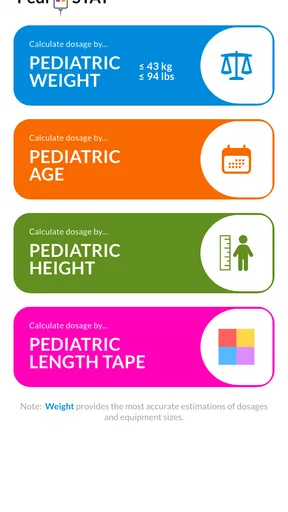
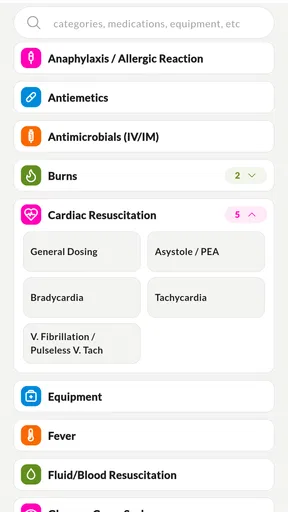
When I first opened Pedi STAT, I was immediately struck by its clean and intuitive design. The interface is straightforward, which is a breath of fresh air in a world cluttered with overly complicated apps. The home screen presents a simple menu, allowing you to dive directly into the features you need without any fuss.
The color scheme is subtle and professional, ensuring that it doesn't distract from the task at hand. Navigation is smooth, with each section clearly labeled and easy to access. Whether you're a tech-savvy user or someone who prefers simplicity, this app caters to all.
Key Features
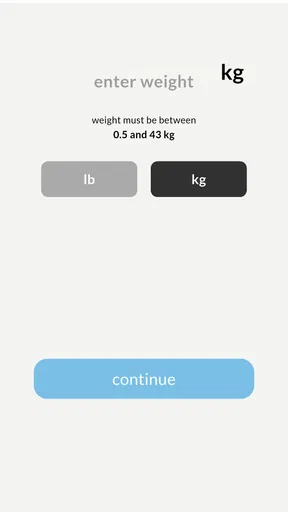
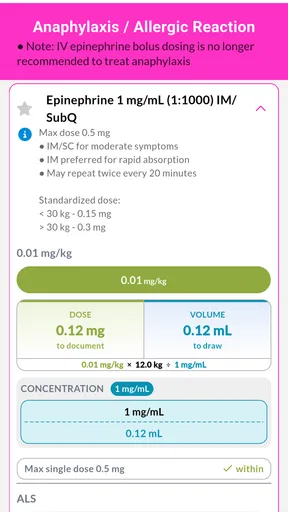
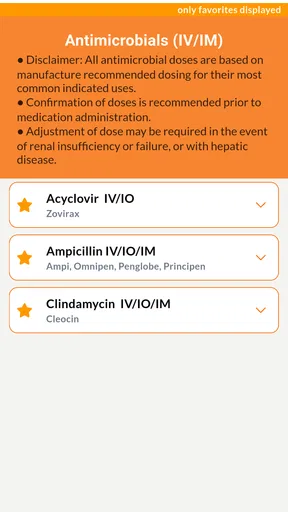
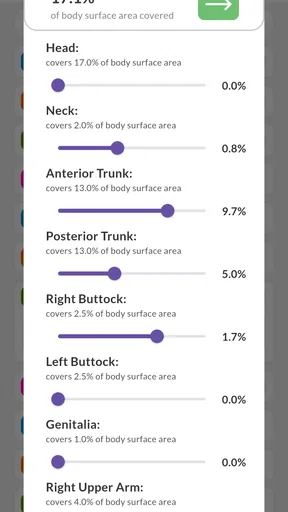
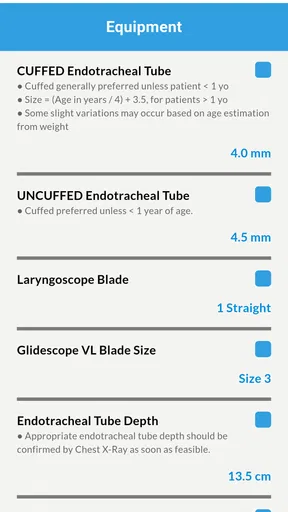
The app is packed with essential features that are a godsend for pediatric care. One of the standout features is the drug dosing calculator. It’s incredibly precise, allowing you to calculate dosages based on weight, which is crucial in pediatrics. I found it to be a game-changer, eliminating the need for manual calculations and reducing the potential for errors.
Another nifty tool is the vital signs reference section. It provides age-specific normal ranges for vital signs, which is super handy during assessments. This feature alone saves time and helps avoid flipping through textbooks or searching online.
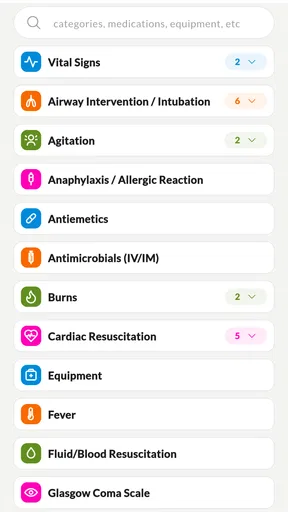
For those tricky situations, Pedi STAT also offers a medical information database. Here, you can find protocols for common pediatric emergencies, making it easier to act swiftly and confidently in critical moments.
Performance and Reliability
In terms of performance, Pedi STAT is solid. I’ve used it on both Android and iOS devices, and it runs smoothly across the board. The app is lightweight, ensuring that it doesn’t hog your device’s resources or slow down your workflow.
Another thing worth mentioning is its offline capability. In areas where internet connectivity might be an issue, having access to vital information offline is a significant advantage. This feature ensures that you’re not left stranded when you need the app the most.
Why It's a Must-Have
For pediatricians, nurses, and medical students alike, having Pedi STAT on your device is like having a tiny assistant by your side. It’s like carrying a pocket-sized pediatric reference that’s always ready to help. The accuracy and reliability of the information provided give you peace of mind, knowing that you can trust the app in any situation.
Moreover, the app is regularly updated, ensuring that the information stays current with the latest medical guidelines. This commitment to keeping the app up-to-date is something I truly appreciate, as it shows the developers are genuinely invested in providing a quality tool for healthcare professionals.
Making it part of a real shift
A realistic use is a clinician checking a child’s weight-based calculation and then consulting an age-related vital-sign range during an assessment. In that moment, the value is not simply that the app displays a result; it is that a focused reference can help the clinician organize the next check without searching through several unrelated sources. I would still keep the patient’s condition and the care team’s established process in view, and I would confirm any decision that depends on the number.
One useful habit is to separate the lookup from the final check: enter the measurement carefully, read the result, then independently review the inputs before using it. That small pause is a better safeguard than treating a polished screen as proof that the answer must be right. If several people share a device, I would also make sure the person entering information has the correct patient and measurement in front of them; quick tools do not prevent mix-ups caused by rushed handoffs.
The app is most appealing to clinicians who see pediatric patients often enough to benefit from a dedicated reference, and to learners who want a compact aid alongside supervision and formal teaching. Someone who treats children only occasionally may prefer to start with the protocols and references already used by their workplace, then decide whether a separate paid app fills a real gap. With a 4.3 average from over 200 ratings and more than 50,000 installs, it has a meaningful user base, though popularity alone does not establish that any clinical content suits every institution.
Choosing it with realistic expectations
The age rating is Everyone, but that describes the app’s content classification, not its intended level of clinical use. Its audience is healthcare professionals, and it should not be treated as a guide for caregivers to diagnose or manage emergencies at home. If you are a parent or guardian concerned about a child, contact an appropriate healthcare professional or emergency service rather than using a professional reference to decide whether care can wait.
For a clinician deciding whether the purchase is worthwhile, I would weigh frequency of use against the resources already available. A pediatric emergency clinician may appreciate having dosing, vital-sign reference, and emergency information close together. A student may find it useful for reviewing familiar material, but it should not replace instruction, supervised practice, or the protocols required in clinical placements. Someone who needs organization-wide guidance or a wider clinical system should prioritize that resource instead.
The main friction is not a complicated feature set so much as the responsibility that comes with using a reference under pressure. You need a charged, accessible device, confidence navigating the material, correct inputs, and a backup route if the app is unavailable. Those are ordinary constraints of mobile clinical tools, but they matter enough that I would build a quick check into routine preparation rather than assume the phone will always be ready.
Wrapping Up
In conclusion, Pedi STAT is more than just an app; it’s a critical tool that enhances the efficiency and effectiveness of pediatric care. Its user-friendly design, coupled with essential features and reliable performance, makes it a must-have for anyone involved in pediatric healthcare.
Whether you're on the front lines of pediatric care or just starting in the field, this app will undoubtedly become one of your go-to resources. So, if you haven't already, give Pedi STAT a try and see how it can transform your practice.
My practical verdict
I see Pedi STAT as a focused convenience, not a complete clinical safety net. Its combination of weight-based dosing support, age-related vital-sign information, and emergency reference material gives pediatric professionals a reason to keep it close, especially when they want a quick lookup without browsing a general search engine. The $5.99 price is easiest to justify when that focused reference fits regular work; occasional users should compare it with the resources their employer or training program already provides.
I would recommend it to clinicians who understand its boundaries and will verify important inputs and decisions. I would skip it as a consumer health app, and I would not choose it over a required local protocol or a broader system when those are what the job calls for. Used as one carefully checked aid among established clinical resources, it can make a pediatric lookup more convenient without pretending to replace the people and procedures responsible for care.
Pros
- User-friendly interface for quick navigation.
- Comprehensive drug dosage calculator.
- Includes detailed pediatric emergency guidelines.
- Offline access to critical information.
- Regular updates with new protocols.
Cons
- Limited customization options for users.
- Requires initial setup for personalization.
- No integration with other medical apps.
- Some features locked behind a paywall.
- Lacks multi-language support.
FAQs for Pedi STAT
What is Pedi STAT and who is it designed for?
Pedi STAT is a medical app specifically designed for healthcare professionals dealing with pediatric emergencies. It provides quick access to critical information and dosage calculations for treating children in emergency situations. The app is useful for doctors, nurses, and paramedics who need immediate, accurate data to make informed decisions in high-pressure environments.
How user-friendly is Pedi STAT for new users?
Pedi STAT is designed with a user-friendly interface that prioritizes ease of navigation. The app's layout allows for quick access to different sections, and the information is organized in a logical manner. Users, especially those new to the app, will appreciate the intuitive design and the ability to find essential data without unnecessary steps.
Does Pedi STAT require an internet connection to function?
Pedi STAT is primarily designed to work offline, which is crucial for emergency settings where internet access may be limited or unavailable. All necessary information, including dosage calculations and emergency protocols, is stored locally on your device, ensuring that you can access it anytime, anywhere.
Is the information in Pedi STAT regularly updated?
Yes, Pedi STAT is committed to providing the most current medical guidelines and dosage recommendations. The app is regularly updated to reflect the latest standards in pediatric emergency care. Users are encouraged to install updates when prompted to ensure they have the most accurate and up-to-date information.
What devices are compatible with Pedi STAT?
Pedi STAT is available for both Android and iOS devices. It is optimized to run smoothly on smartphones and tablets, ensuring that healthcare professionals can access the information they need regardless of their preferred device. Check the app’s compatibility with your device's operating system version before downloading.


